
Recruitment Desk
What it does:
Recruitment Desk is a lightweight, purpose-built UX Research tracker I designed to manage the entire participant recruitment pipeline for UX research studies, from aligning on participant criteria to signing the NDA.
It covers:
Criteria — A living record of total sample size, participant types, and stakeholder notes, so everyone stays aligned on who we're recruiting and why.
Screener & Demographic Questions — A place to define the exact questions from the recruitment survey, along with which answers qualify, disqualify, or are simply informational — including support for "select all that apply" questions with nuanced rules (e.g., one answer might automatically disqualify someone regardless of what else they selected).
Eligible Participant Roster — Every respondent, ranked from best to worst fit, with their survey responses and screener answers attached, so the strongest candidates always rise to the top.
Outreach Tracking — Clear, timestamped tracking of who's been contacted, who's responded, and who still needs a nudge.
Interview Scheduling — A dedicated place to log confirmed interview times once they're locked in.
NDA Status — Visibility into who's been sent an NDA and who still needs to sign.
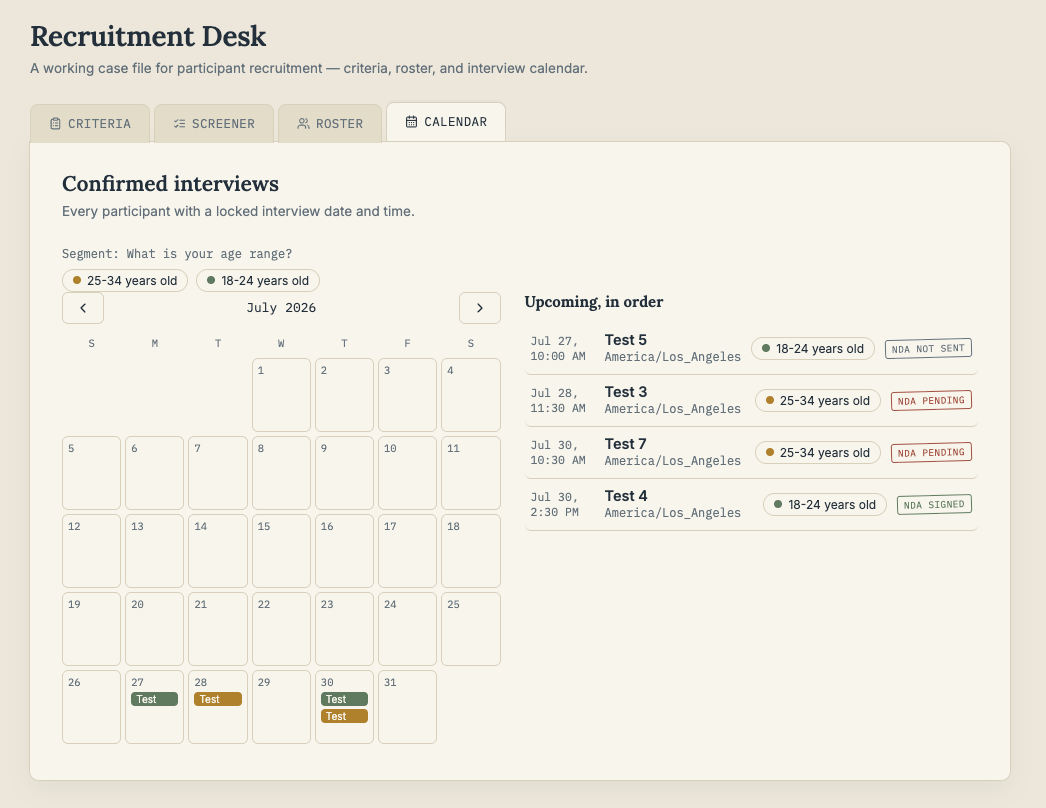
Calendar View — A month-at-a-glance summary of every confirmed interview, color-coded by participant segment (e.g., age range), with one click to pull up full participant details.
A few notes:
This is a working demo, not a production system. Data is stored locally in the browser, so it's ideal for showing how the workflow functions, but a real deployment would use a proper database and connected email service for the automated NDA reminders.
I designed every part of this around actual pain points I've experienced managing recruitment, not a generic template. The prioritization logic, the flagging system, and the segment-based calendar view all reflect real decisions I've had to make on live studies.
Why it matters:
Recruitment is often the most time-consuming, least visible part of a research project, most likely to fall apart across scattered spreadsheets, email threads, and sticky notes. A missed follow-up or an unclear screener answer can cost a study days or derail a timeline entirely. Recruitment Desk exists to solve that by giving research operations one single source of truth. Instead of cross-referencing five different documents to answer "who have we heard back from?" or "is this person actually eligible?", everything lives in one place, updates in real time, and is organized by what actually matters at each stage of the process.
The result: less time spent managing logistics, fewer dropped threads, and more time spent on the research itself.
Try Recruitment Desk yourself (most up to date version)!
How I Built This: Vibe Coding with AI
I built Recruitment Desk with vibe coding. The process looked like this:
I identified an administrative problem in the UXR process that AI can make more efficient. In this case, it was tracking recruitment steps from confirming participant criteria to signing the NDA.
I described the problem I wanted to solve and Claude built a working prototype in a single conversation.
From there, I iterated feature by feature, in plain English: "add a bulk import option," "let me mark screener answers as qualifying or disqualifying," "color-code the calendar by age segment." Each request became a real, working update to the tool.
Once the tool was solid, I asked for help turning it into an actual website. Claude converted it into a standalone file, walked me through publishing it on GitHub, and helped me embed it directly into this Squarespace site.
I share this because I think it's relevant context for how I work: I don't need to be an engineer to build functional tools that solve real operational problems. I know how to identify a workflow gap, describe a solution clearly, test it, and iterate until it actually works — which is, in a lot of ways, the same skill set that makes for good research operations.
Example (images from version 1): How I'd Use It on a Real Study
Say I'm running a study that needs 12 participants, segmented into 6 young adult users aged 18-24 years old and 6 older adult users aged 25-34 years old.
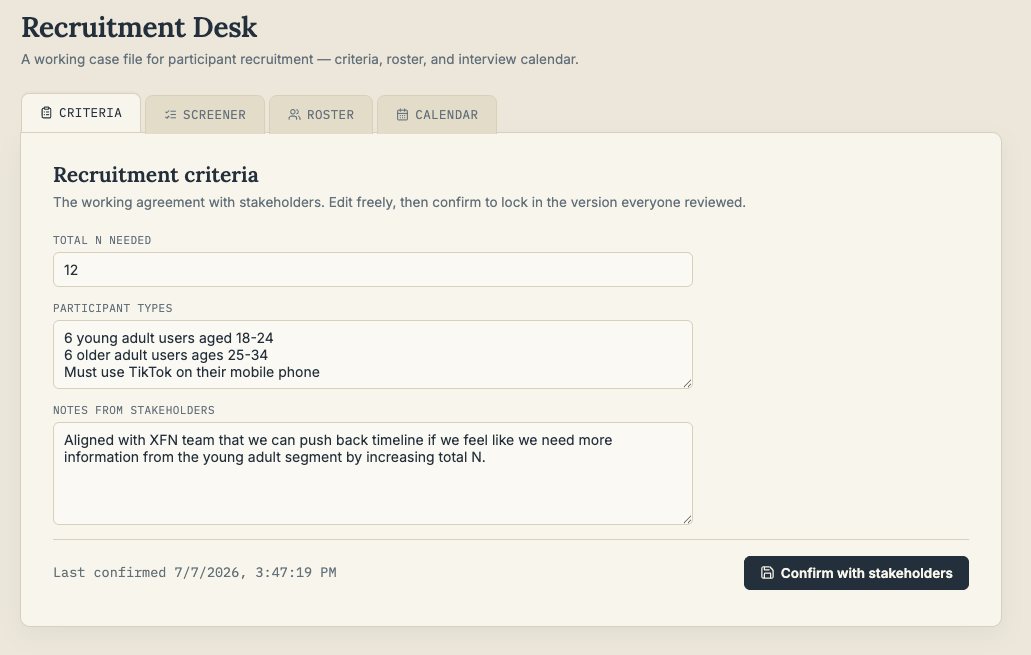
1. Set up criteria with the team
Confirm participant criteria and note any must-haves stakeholders flagged.
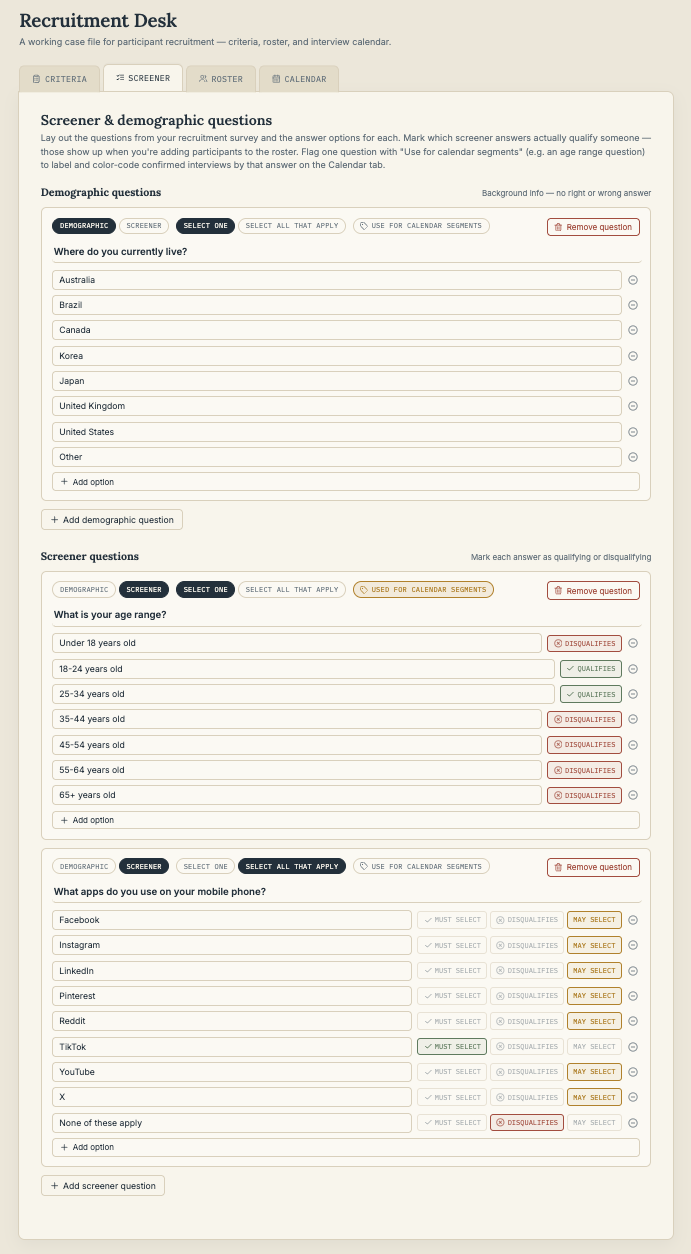
2. Build the screener
Include demographic and screener questions (e.g., "What apps do you use on your mobile phone?") and mark as disqualifying if selected. Identify which questions are segmentation questions, which the tool references in the calendar view so all the information is neat and organized.
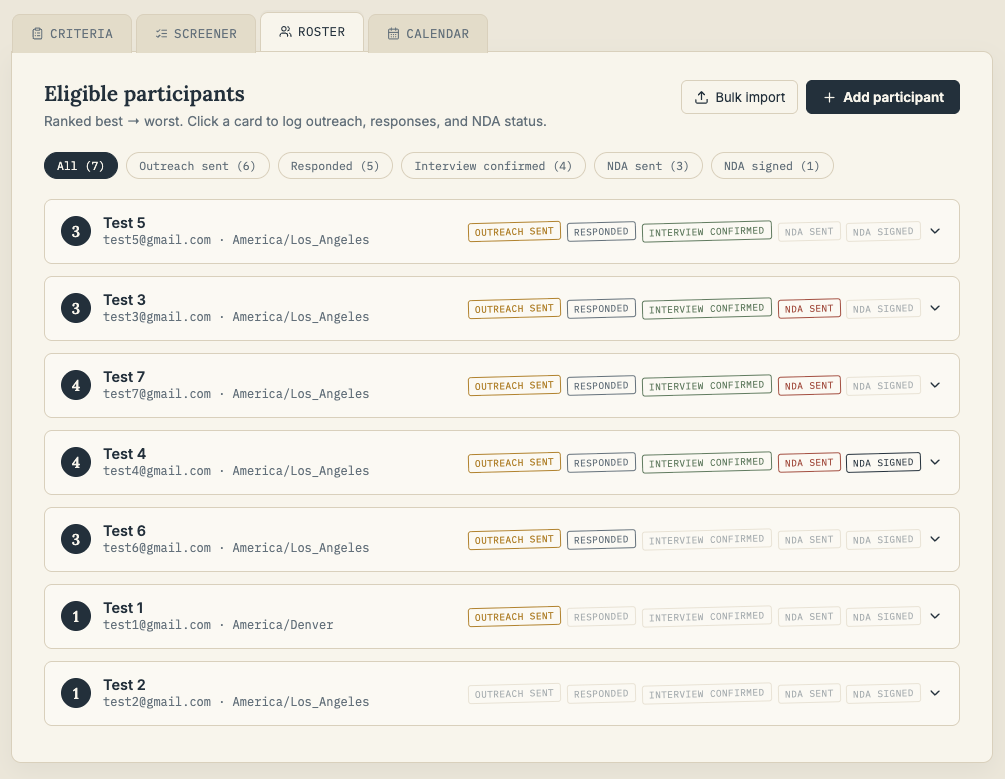
3. Import and Rank eligible participants
Bulk import survey responses the moment they come in, pasted straight from the results spreadsheet. The roster automatically ranks and flags anyone who answered a disqualifying question, so I know at a glance who's actually eligible.
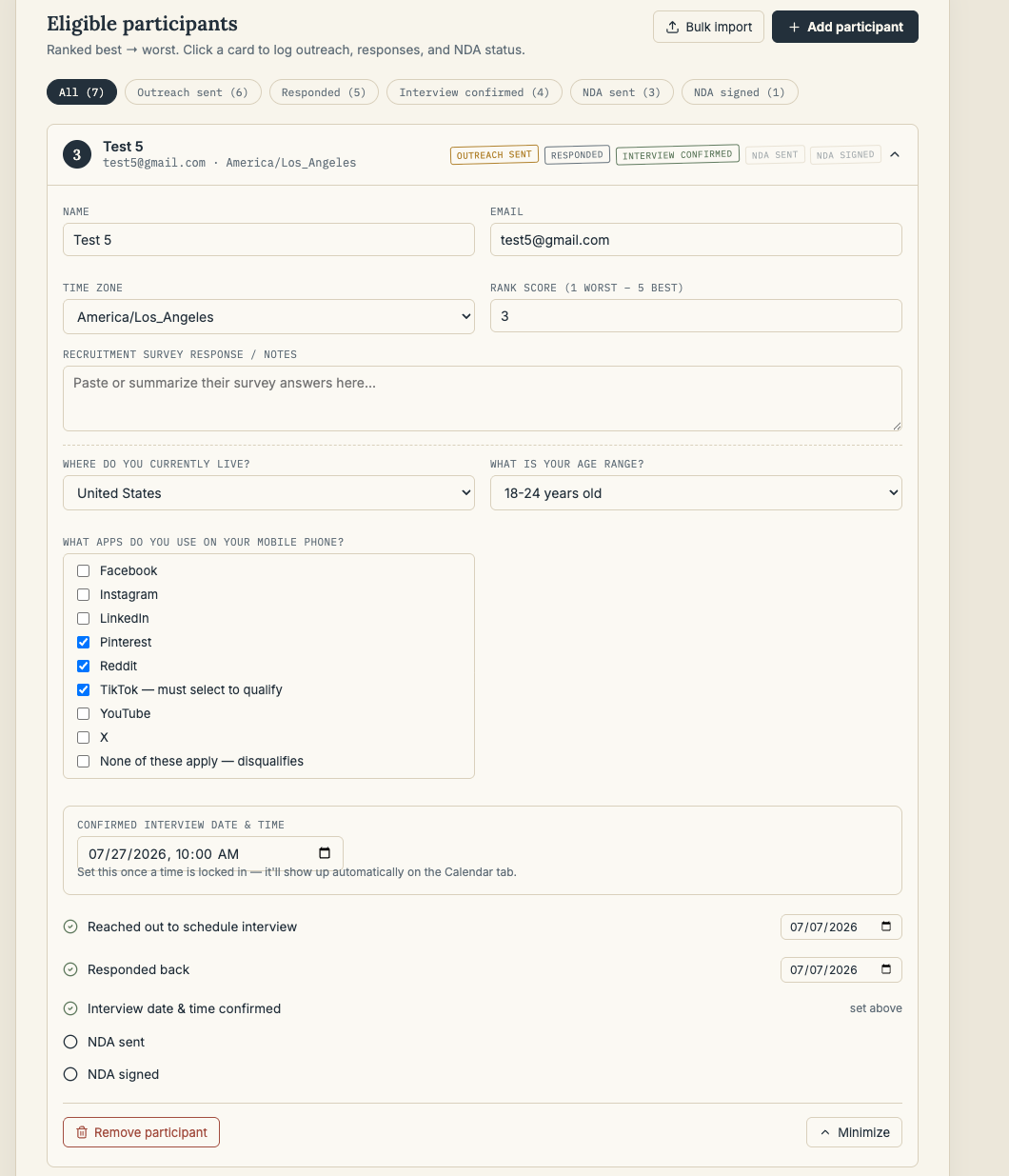
4. Reach out and Track progress
I mark each outreach and response, which the list automatically reorders to surface who still needs a nudge. Once someone locks in a time, I log it in Confirmed Interview, and it instantly shows up on the Calendar.
5. Stay organized with interview details
The confirmed interview is color-coded by age segment, so I can see at a glance how my sample is shaping up across both age bands. NDA tracking keeps me on top of paperwork so nothing slips through before interview day.
future Iterations
Automation and Workflow
Email Integration: Connect to Gmail or Outlook so the tool can automatically track participant recruitment progress and send email follow-ups/NDAs without the researcher manually toggling checkboxes themselves.
Calendar Integration: Connect to personal email so confirmed interview dates and times show up on the researcher’s actual calendar, without having to reference two calendars.
Survey Tool Integration: Connect to Google forms or Qualtrics so the screener becomes the actual survey in Qualtrics and researcher’s don’t have to build the same survey twice.
Self Service Scheduling Links: The tool can track when you have availabilities on your calendar to provide to participants, so they can easily pick their own slots without continuous back and forth.
E-signature Integration: Connect to Docusign or other NDA tool so signing happens right in the flow without a separate pop-up, which can sometimes feel like a scam.
Team and Collaboration
Multi-user permissions: Allow multiple users ability to view and edit the tool, so different XFN can provide input on which participant they want to prioirtize
Multi-study support: Allow more than one study to take place concurrently